You launch a campaign, orders start coming in, and the dashboard looks healthy. Then the hard question shows up. Why did people buy? Not which click got credit. Not which platform claims the sale. The underlying reason a customer trusted your store enough to place an order.
That gap is where a good post purchase survey earns its keep.
Most new store owners either skip surveys entirely or overdo them with long forms that feel like homework. The better approach is simpler. Ask a small number of smart questions at the right moment, then turn those answers into decisions about marketing, product, fulfillment, and retention.
Table of Contents
- Why Post Purchase Surveys Are Your Secret Growth Lever
- Designing a Survey That Customers Actually Complete
- When and Where to Ask for Feedback
- Advanced Tactics for Higher Response Rates
- Turning Raw Data into Business Growth
- Start Listening to Your Customers Today
Why Post Purchase Surveys Are Your Secret Growth Lever
A customer buys a digital template, reaches the thank-you page, and can still tell you which ad made the offer click. A customer buys a sofa, and the better question is often about purchase motive or expected use, because product satisfaction will not be clear until delivery and setup. That difference is why post purchase surveys matter. They capture insight while memory is fresh, but the right insight depends on what the customer bought and what decision your team needs to make.
A good post purchase survey gives you information analytics tools usually miss. Platforms can estimate source, device, and on-site behavior. They do a much worse job capturing stated intent in the buyer's own words. That gap matters when you are trying to decide which message to scale, which objection to fix, or which customer segment is driving demand.
Why this touchpoint matters so much
The best time to ask depends on the product.
For physical products, the immediate post-purchase window is strongest for attribution, objections, gifting context, and expected outcomes. It is too early for a meaningful product-quality verdict in many categories. For digital products, software, courses, and downloads, that window can also work for early satisfaction questions because use starts faster.
That distinction gets missed all the time. Store owners ask every customer the same survey at the same moment, then wonder why the answers feel thin or misleading.
Used well, one short survey can support several business decisions:
- Attribution questions help fill gaps left by platform reporting and self-attribution tools.
- Friction questions show what nearly stopped the order, which is often more actionable than a generic satisfaction score.
- Purchase-motive questions explain whether the buyer wanted convenience, quality, speed, gifting, or a specific outcome.
- Expectation questions help merchandisers and support teams prepare for what customers believe will happen next.
If you need a starting point, review a simple product feedback form template and map each question to a business decision before you send anything live.
What new store owners usually miss
In our experience working with new store owners, surveys often get pushed behind ad tracking, email flows, and site conversion work. That sounds reasonable until you see what survey responses do for those channels.
The answers give you usable language for product pages, ad creative, welcome flows, retention campaigns, and support macros. They also expose trade-offs that dashboards hide. A high-converting campaign might be attracting gift buyers instead of repeat customers. A product might sell because of price, even though your ads keep pushing craftsmanship. An offer may work well for digital buyers who need speed, but underperform for physical-product buyers who care more about shipping clarity or fit.
That is why I treat post purchase surveys as an operating system, not a one-off research task. The goal is not to collect a pile of comments. The goal is to turn open-ended feedback and purchase-motive data into decisions your team can use.
Designing a Survey That Customers Actually Complete
Most bad survey performance starts before timing, incentives, or tools. It starts with a vague brief. If you don't know what decision the survey should support, you'll ask too many questions and get muddy answers.

Start with one decision
Pick a single objective for the survey. Not three. Not “general customer feedback.” One decision.
Good starting goals for a store owner usually look like this:
- Attribution clarity: “How did you hear about us?”
- Conversion friction: “What almost stopped you from buying today?”
- Product expectation: “What are you most hoping this product will help with?”
- Purchase context: “Was this purchase for you or for someone else?”
If you're unsure where to begin, review a simple product feedback form template and work backward from the exact decision your team needs to make.
Pick formats that match the question
Not every question should use the same answer type. A practical survey mixes structure with room for nuance.
Here's the pattern I use most often:
| Question type | Best use | Example |
|---|---|---|
| Multiple choice | Known categories | “Who was this purchase for?” |
| Rating scale | Experience quality | “How easy was checkout today?” |
| Open text | Motivation or blockers | “What almost stopped you from buying?” |
| Single select plus Other | Attribution | “How did you hear about us?” |
For a clothing brand, a multiple-choice question about intended use can work well. For a perfume store, open text often gives better answers because customers describe scent expectations in ways you wouldn't have predicted. For dog food, asking what problem the buyer wants to solve can uncover concerns like digestion, picky eating, or ingredient trust.
The best survey question is the one that leads to a clear next action. If the answer won't change a decision, cut it.
Use logic so the survey feels short
Conditional logic matters because relevance matters. A first-time buyer shouldn't get the same follow-up as a repeat customer. Someone buying a gift shouldn't see the same post-purchase path as someone buying for themselves.
A simple conversational flow might look like this:
- Question one: How did you hear about us?
- If “Other” is chosen: Tell us where.
- If “Friend” is chosen: Was it a personal recommendation or a social post?
- If returning customer: Skip first-discovery questions and ask about why they came back.
That's also where one-question-at-a-time forms help. They reduce visual clutter and make the interaction feel lighter than a traditional page full of fields.
Later in your setup, this walkthrough can help you think through pacing and on-screen experience:
What to avoid
A survey doesn't fail only when customers ignore it. It also fails when they complete it quickly and give shallow answers because the form is bloated.
Common design mistakes include:
- Too many goals in one survey: Attribution, satisfaction, demographics, and product research shouldn't all live in one touchpoint.
- Generic wording: “Tell us about your experience” is too broad to be useful.
- Answer choices you invented too early: This is how valuable responses get buried in “Other.”
- Questions that arrive out of sequence: Don't ask about product quality before a customer has received a shipped order.
Good surveys feel obvious to answer. Great surveys feel like part of the buying experience rather than extra work.
When and Where to Ask for Feedback
The biggest timing mistake in post purchase survey strategy is treating every order the same. A digital download, a skincare subscription, and a bag of dog food don't create the same feedback window. If you ask at the wrong moment, you'll collect the wrong truth.
Choose the channel based on the job
You have two primary delivery options for most stores. Show the survey on the confirmation page, or send it later by email. Both work. They just answer different questions.
Here's a practical comparison:
| Method | Best For | Pros | Cons |
|---|---|---|---|
| On-site confirmation page | Attribution, checkout experience, purchase motivation | Immediate context, low friction, answers tied closely to the order moment | Too early for real product or delivery feedback |
| Follow-up email | Product quality, shipping, packaging, post-delivery satisfaction | Gives customers time to receive and use the product | More inbox competition, weaker recall for checkout-specific details |
If you need a ready-made structure for the experience side of this, a shopping experience feedback form is a useful starting point.
Timing changes by product type
Most generic advice frequently proves unhelpful in practice.
Survey guidance often defaults to “ask immediately after checkout,” but that only covers part of the customer journey. Independent guidance on post-purchase surveys makes an important distinction. Immediate surveys are best for checkout feedback, while physical goods should be surveyed after delivery confirmation so customers can judge product quality, shipping, and whether the item matched expectations.
That distinction is more important than it sounds.
If you sell a digital product, course, membership, or software access, immediate or near-immediate follow-up can work well because the customer can often evaluate the initial experience right away.
If you sell physical goods, especially categories where sensory or fit expectations matter, asking too early creates blind spots:
- Apparel: Customers may love checkout and hate the fit.
- Perfume: The transaction may be smooth, but scent mismatch drives the ultimate reaction.
- Dog food: The packaging, delivery condition, and the pet's response matter more than the cart experience alone.
Ask right after checkout when you want the truth about buying. Ask after delivery when you want the truth about receiving and using.
A practical sequence for most stores
Many stores do better with two smaller survey moments than one overloaded survey.
A clean operating rhythm looks like this:
- Post-checkout survey: Use it for attribution, purchase motivation, and checkout friction.
- Post-delivery survey: Use it for fulfillment, packaging, expectation match, and product feedback.
- Ongoing review: Compare answers by product line, customer type, and recurring complaint themes.
This approach helps you avoid one of the most common mistakes in post purchase survey programs. Teams ask one survey at one time and assume the answers reflect the whole experience. Often, they only reflect the part the customer has lived through so far.
Advanced Tactics for Higher Response Rates
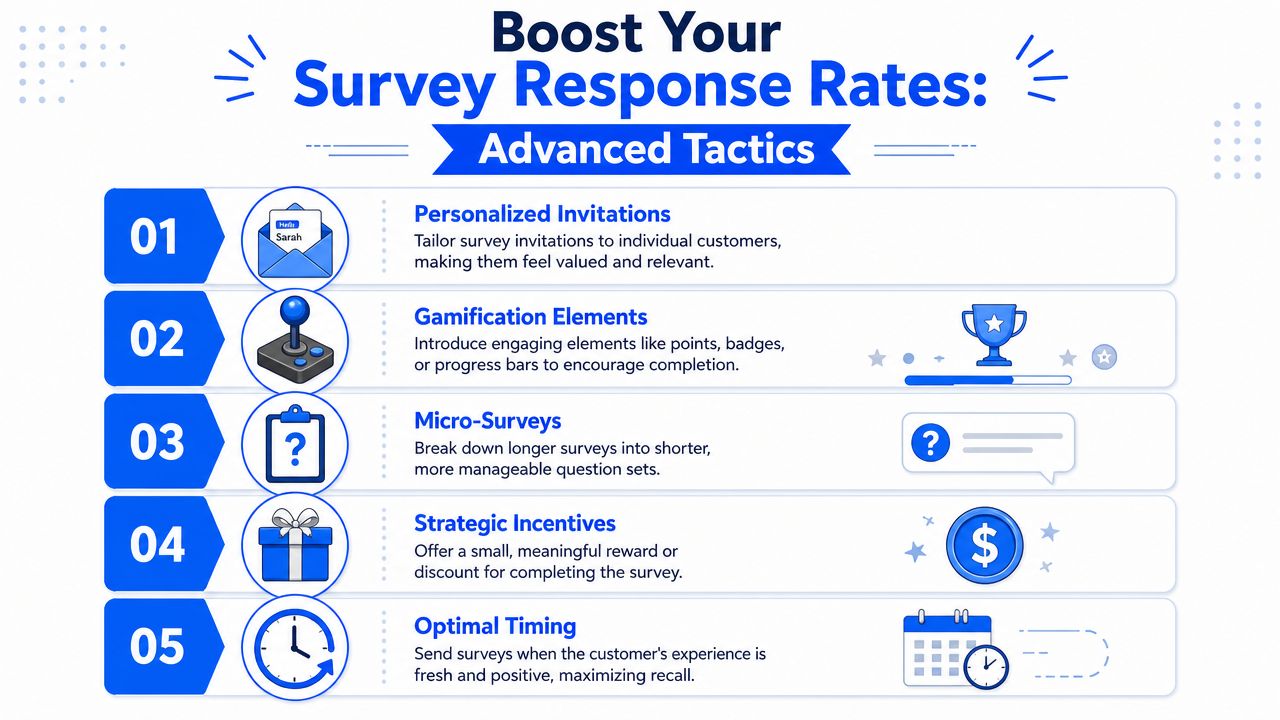
Once a survey is live, improving performance often involves changing copy or adding a discount. That can help, but the larger gains usually come from fixing structural problems first.
BlueConic highlights the main pitfalls in post-purchase survey guidance: survey fatigue, poor timing, non-mobile optimization, over-surveying, and not acting on feedback. The same guidance recommends short, focused surveys with a mix of closed and open-ended questions, plus incentives such as discounts or loyalty points.
What hurts response quality
The obvious problem is a low completion rate. The less obvious problem is a completed survey full of rushed, low-value answers.
That usually happens when stores do one or more of the following:
- Over-survey loyal buyers: Repeat customers get hit with the same questions after every order.
- Ignore mobile behavior: The form works on desktop but feels awkward on a phone.
- Ask broad questions with no context: Customers don't know what kind of answer you want.
- Collect feedback and shelve it: Buyers stop taking surveys seriously if nothing improves.
A survey can be short and still feel annoying if it shows up too often or asks irrelevant questions.
What usually works better
Better response quality comes from relevance. Customers answer when the question feels timely and appropriate.
A few tactics consistently help:
- Segment by customer type: First-time buyers can answer discovery or trust questions. Repeat buyers should get loyalty, product expansion, or reorder-related questions.
- Keep the ask narrow: One focused question often beats a mini questionnaire.
- Use incentives carefully: Discounts or loyalty points can nudge participation, especially for follow-up email surveys.
- Design for thumbs, not mice: Large tap targets, short screens, and simple answer paths matter.
- Rotate questions: If you need multiple insights, don't ask every customer everything.
A short survey isn't enough. It also has to feel relevant to the person seeing it.
Personalization without overcomplication
Personalization doesn't need to mean a complex branching tree. It can be as simple as changing the first question by order context.
Examples:
| Customer group | Better first question |
|---|---|
| First-time buyer | How did you hear about us? |
| Returning customer | What brought you back today? |
| Gift buyer | Who was this purchase for? |
| High-consideration product buyer | What nearly stopped you from ordering? |
I've seen stores improve the usefulness of their survey program by stopping themselves from asking a repeat customer how they first found the brand. That answer is already old news. The better question is why they returned.
Another overlooked move is closing the loop publicly and privately. If customers repeatedly mention confusing sizing, shipping anxiety, or lack of product detail, update the site and mention that you made changes based on feedback. That increases trust and makes future survey requests feel justified.
Turning Raw Data into Business Growth
The survey itself isn't the asset. The asset is the decision you can make because the survey exists.
A lot of teams collect answers, export a spreadsheet, and stop there. That's where value leaks out. Raw customer feedback only becomes useful when you classify it, connect it to orders, and route it to the team that can act on it.

Clean up messy answers before they become bad reporting
One of the most overlooked parts of a post purchase survey is the open-text “Other” field. Guidance from The Underrated Power of Post Purchase Surveys recommends regularly reviewing repeated “Other” responses and folding recurring sources into the main options. That sounds small, but it keeps your reporting usable as response volume grows.
Without that cleanup, your survey gets harder to trust over time.
A simple operating model works well:
- Review open-text answers regularly.
- Group repeated themes into clean categories.
- Promote frequent “Other” answers into standard response options.
- Keep the raw text for nuance even after categorization.
If many customers keep typing “podcast,” “subreddit,” “friend's recommendation,” or a creator name into “Other,” your answer set is telling you it's outdated.
Turn survey answers into segments and actions
The same source also points to an important shift in how smart brands use surveys. They're not just asking where customers came from. They're using surveys for purchase-motive segmentation, such as whether the purchase was for self or gift, and what problem the product is meant to solve.
That opens up better downstream actions:
- Gift buyers can receive a different post-purchase email path than self-buyers.
- Problem-solution segments can shape landing page copy and merchandising.
- Competitive mentions can inform comparison content and sales enablement.
- Expectation-based answers can flag where your product page is overselling or underselling.
Your form stack is key. A tool like VeeForm's data collection form template can help structure responses in ways that sync cleanly to CRM and marketing workflows, especially when you need both multiple-choice fields and open text.
Don't let “Other” become a junk drawer. It's often where the most strategic insight starts.
Connect feedback to the rest of your retention engine
Survey responses also work better when they aren't isolated from adjacent systems. If customers leave strong product sentiment, you can route them toward review and testimonial requests. If they report friction, you can route them to support or onboarding.
That's why it helps to pair survey analysis with broader customer advocacy work, including proven review collection strategies that turn satisfied buyers into visible social proof.
A practical activation model looks like this:
| Survey signal | Action |
|---|---|
| Positive product reaction | Ask for a review or testimonial |
| Shipping complaint | Alert operations or customer support |
| Repeated competitor mention | Update comparison messaging |
| Gift purchase | Move buyer into gift-focused lifecycle messaging |
| “Other” source repeats often | Add a new attribution option |
The important part is speed. If your survey says customers are confused about scent strength, fit, ingredients, or shipping expectations, the winning move isn't to admire the insight. It's to update the product page, the FAQ, or the confirmation flow while the pattern is still current.
Start Listening to Your Customers Today
A good post purchase survey doesn't need to be complicated. It needs to be timely, focused, and tied to a real business decision.
Start with one question. Keep it short. Decide whether you need checkout insight, product feedback, or purchase-motive data. Then place the survey where that answer is most likely to be honest.
If you sell digital products, you can ask closer to the order moment. If you ship physical goods, wait until delivery when the customer can judge what arrived. If you use open-text answers, review them often enough that “Other” doesn't become a blind spot. If customers tell you why they bought, who they bought for, or what almost stopped them, push that data into the systems your team already uses.
That's the compounding effect. One survey answer can improve ad creative, landing pages, email segmentation, fulfillment messaging, and support scripts all at once.
There's also a natural handoff from survey feedback into trust-building assets. When customers share positive sentiment or explain results in their own words, tools built as a platform for customer testimonials can help you turn that voice-of-customer signal into usable proof across your site and campaigns.
You don't need a massive program to get started. You need a useful question and a habit of acting on what you learn.
If you want to launch a post purchase survey without heavy setup, VeeForm gives Shopify teams a no-code way to build one-question-at-a-time surveys, add logic, and route answers into the rest of their workflow.
